How to Find Trade Show Attendees & Book Meetings Before the Event
Learn how to book meetings before a trade show, reduce cost per lead, and maximize trade show ROI with pre-show attendee outreach and targeted event prospecting.
Trade shows are expensive. Between booth fees, travel, hotels, and the time your team spends away from their desks, a single event can easily cost $20,000–$50,000. And yet, most companies show up without a plan for who they'll actually talk to –and then wonder why their trade show ROI is so low.
They walk the floor. They scan badges. They collect a pile of business cards from people who were "just browsing." And when they get home, the leads go into a CRM and slowly die.
There's a better way.
The companies that consistently maximize trade show ROI do something different: they identify who's attending before the event, filter those attendees against their Ideal Customer Profile (ICP), and pre-book meetings in advance. By the time they land at the airport, their calendar is already filled with qualified prospects.
This guide breaks down every method we've found for trade show lead generation –identifying attendees and exhibitors before the event starts. We'll cover paid data providers, LinkedIn research, web scraping, community monitoring, and several less obvious approaches. For each method, we'll explain exactly how it works, what tools you need, and when it makes sense to use it.
Whether you're a sales team preparing for your next conference, a marketing manager trying to reduce trade show cost per lead, or a founder who can't afford to stop wasting trade show budget on unqualified conversations –this is the playbook.
Why Pre-Show Attendee Outreach Matters
Before we dive into the methods, let's establish why this matters so much.
According to CEIR (Center for Exhibition Industry Research), the average cost per lead at a trade show is $142: significantly higher than most digital channels. But here's the thing: that number includes all the low-quality badge scans and "just passing by" conversations. When you focus on pre-qualified meetings, you dramatically reduce your trade show cost per lead –and your event conversion rate goes up.
The Math Behind Pre-Event Outreach
Let's say you're attending a trade show that costs your company $30,000 all-in (booth, travel, materials, staff time). Without pre-event outreach, you might have 50 booth conversations, of which maybe 10 are with people who actually fit your ICP. That's $3,000 per qualified conversation.
Now imagine you invested in pre-show attendee outreach –identifying attendees, filtering for ICP, and booking 15 guaranteed trade show meetings in advance. Those 15 meetings are guaranteed qualified conversations –the people already agreed to meet, and you've already verified they're a fit. Add in another 10 good conversations from the booth, and you've got 25 qualified leads for the same $30,000. That's $1,200 per lead –a 60% improvement in trade show booth ROI.
Same $30,000 event budget
Without pre-event outreach
10
qualified leads
$3,000
per qualified lead
With pre-event outreach
25
qualified leads
$1,200
per qualified lead
60% lower cost per lead
The point isn't that booth conversations are bad. It's that pre-event outreach turns a trade show from a passive experience into an active, targeted event prospecting campaign.
What You Need to Make Trade Show Meeting Booking Work
Every pre-event outreach strategy follows the same basic pipeline:
- Source: Find people and companies who are attending the event
- Filter: Evaluate them against your ICP criteria (industry, company size, role, geography, etc.)
- Enrich: Get contact details, understand their business, find relevant talking points
- Outreach: Reach out to propose a meeting at the event
- Confirm: Get a time and place on both calendars
The rest of this guide focuses primarily on step 1 – sourcing – because that's where most teams get stuck. Steps 2–5 are more straightforward once you know who to target.
Pre-event outreach pipeline
Source
Find attendees
Filter
Match to ICP
Enrich
Get contact details
Outreach
Propose a meeting
Confirm
Book on calendar
This guide focuses on Source — finding attendees is where most teams get stuck.
Method 1: Event Data Providers
The most direct way to find trade show attendees is to buy the data from companies that specialize in aggregating event intelligence. There are a handful of providers in this space, each with different strengths and limitations.
10times
Website: 10times.com
10times is one of the largest event data platforms in the world. They index hundreds of thousands of trade shows, conferences, and exhibitions globally, and they provide data across three main dimensions: events, companies, and people.
How to Use 10times for Attendee Research
The platform works as a searchable database with filters. Here's the typical workflow:
- Find your event: Search for the trade show you're planning to attend. 10times covers events across nearly every industry and geography.
- Browse companies: Once you've found the event, you can see which companies are listed as attendees or exhibitors. Filter by industry, company size, or other criteria.
- Pull people: For each company, you can see associated contacts – typically people who have registered or been associated with that event.
The key insight with 10times is the credit separation model. Your credits are split across their three endpoints (events, companies, people), so you need to plan your research strategically. For example, you might use event credits to identify your target events, company credits to find who's attending, and then use a different tool entirely (like Apollo or LinkedIn Sales Navigator) to find the specific people at those companies.
Strengths
- Massive event coverage: they probably have your event, regardless of industry or geography
- Non-technical interface: the dashboard is usable by sales reps, not just data engineers
- Multiple data dimensions: events, companies, and people are all searchable and filterable
- Good for initial scoping: even before you buy data, you can see roughly how many companies and people are associated with an event
Pricing
Subscriptions start at $1,000/month on a credit-based model, with credits split across events, companies, and people endpoints.
Limitations
- API is not publicly available: if you want programmatic access (which you will for any serious operation), you need to request API keys through their team. In our experience, their API is still being refined and isn't as polished as you'd expect from a mature data product
- Data completeness varies: major events like CES, HIMSS, or CONEXPO will have good coverage. Smaller regional trade shows may have sparse or outdated data
- Credit system can be limiting: if you're researching multiple events, credits can run out quickly
- Data freshness: attendee lists change as new people register. The data you pull today might not reflect the final attendee list
Best For
Sales teams attending well-known industry events who want a quick way to identify potential targets without heavy technical setup. Works well as a starting point that you supplement with other methods.
Exhibitors Data
Website: exhibitorsdata.com
Exhibitors Data operates more like a traditional B2B data provider – they sell bulk datasets of event attendees and exhibitors. Rather than a self-serve dashboard, you typically work with their team to define what you need, and they deliver a dataset.
How It Works
- Specify your target event(s): Tell them which trade shows you want attendee data for
- Receive a dataset: They deliver a CSV or similar format with company names, contact information, and event association
- Clean and enrich: The raw data usually needs significant processing before it's usable for outreach
Pricing
Datasets start at $500 each, though some can run up to $800 depending on the event and data scope. There's a minimum purchase of 4 datasets, so expect an entry cost of at least $2,000. They also offer a 6-month subscription at $2,200 that includes 1 dataset per month – but whether that's cost-effective depends on how frequently you attend events, so evaluate based on your own calendar.
Strengths
- Bulk data delivery: you get everything at once, which is useful for larger operations
- Can cover niche events: they sometimes have data on smaller events that other platforms miss
- Flexible format: data is delivered in standard formats you can import into your CRM or outreach tools
Limitations
- Data quality is inconsistent: expect duplicates, outdated contacts, and missing fields. You'll need to invest time in data cleaning and verification
- Minimum commitment: the 4-dataset minimum means you're spending at least $2,000 upfront, which is a hard sell if you only care about one event
- Static snapshots: you get data at a point in time. If you buy the dataset 3 months before the event, the actual attendee list will have changed significantly by the time the event arrives
- No self-serve: you can't just log in and search. The sales process itself takes time
Best For
Larger companies with dedicated data operations teams who can handle cleaning and enrichment. Not ideal for teams that need quick, ready-to-use attendee lists.
Comparing Data Providers
| Feature | 10times | Exhibitors Data |
|---|---|---|
| Self-serve dashboard | Yes | No |
| API access | By request only | By request only |
| Event coverage | Very broad | Varies |
| Data quality | Moderate | Moderate (requires cleaning) |
| Pricing model | From $1,000/mo (credit-based) | Per-dataset (4 minimum) |
| Best for | Initial scoping + targeted research | Bulk data operations |
| Time to value | Minutes (dashboard) | Days/weeks (sales process + delivery) |
Method 2: LinkedIn Advanced Search
If data providers are the "buy" approach, LinkedIn is the "build" approach. It takes more effort, but the signal quality is dramatically higher – because you're finding people who have publicly stated they're attending the event.
Why LinkedIn Works So Well for This
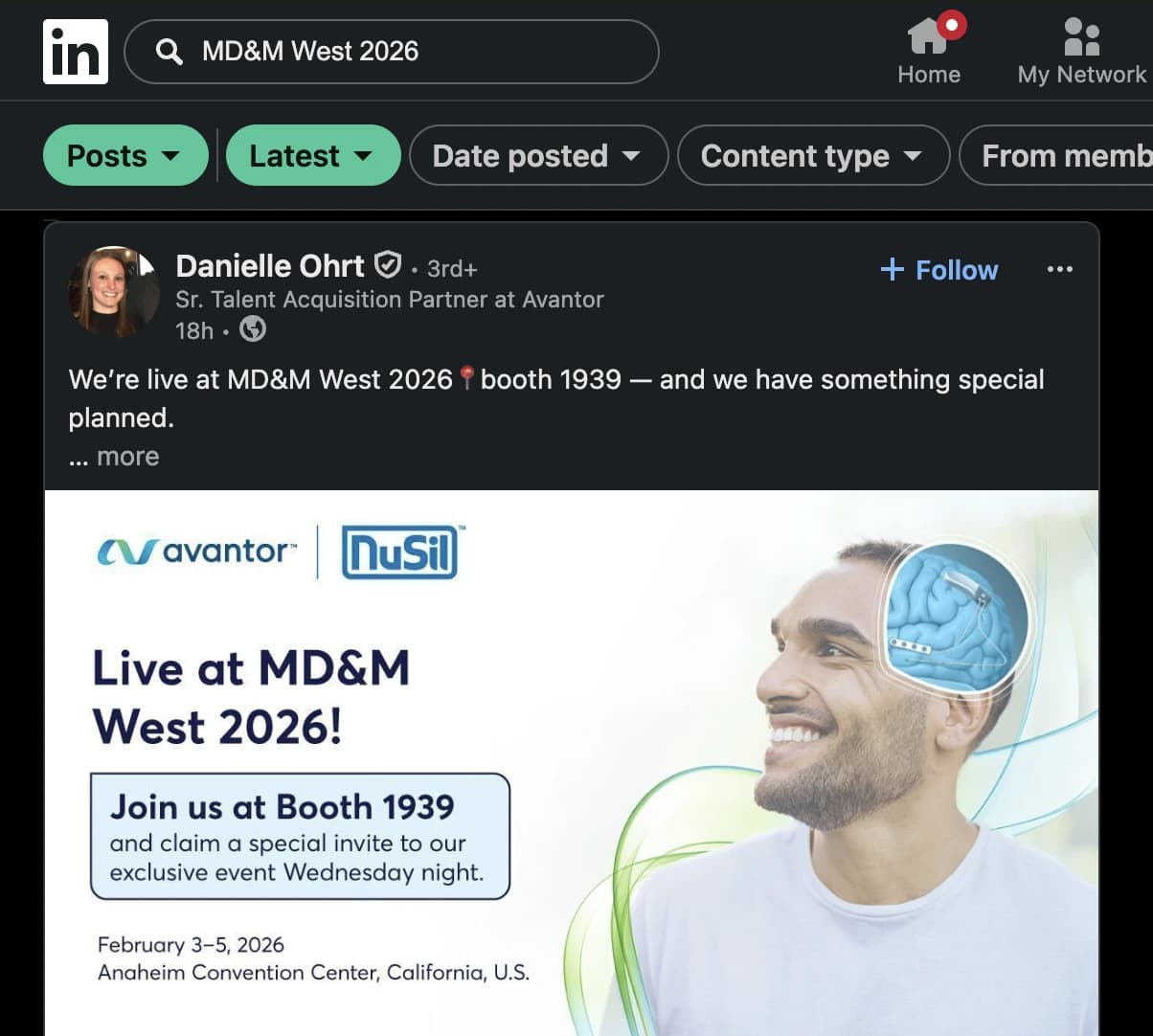
People love to announce their trade show plans on LinkedIn. It's part professional networking, part marketing for their company's booth. A typical post looks like:
Excited to attend HIMSS 2026 next month! If you're working on interoperability solutions, let's connect – I'll be at booth #4521.
That single post tells you:
- Who is attending (the person who posted)
- What company they represent (visible on their profile)
- What they care about (interoperability solutions)
- Where to find them (booth #4521)
- Their openness to meetings ("let's connect")
This is incredibly high-quality intent data – and it's free.
How to Search Effectively
LinkedIn's search supports several operators and filters that make attendee research more targeted:
Basic Search Approach
- Go to LinkedIn's search bar
- Enter the event name or hashtag (e.g.,
#HIMSS2026or"HIMSS 2026") - Filter by Posts to see who's talking about the event
- Filter by date to focus on recent posts (within the last month or two)
Advanced Search Operators
LinkedIn supports Boolean operators in search. Here are useful queries:
"HIMSS 2026" AND ("visit us" OR "booth" OR "attending")– finds people announcing their attendance"CONEXPO 2026" AND ("let's meet" OR "schedule" OR "connect")– finds people actively seeking meetings"IBS 2026" AND ("exhibiting" OR "showcasing" OR "launching")– finds exhibitors specifically
Using LinkedIn Sales Navigator
If you have Sales Navigator ($99/month and up), your capabilities expand significantly:
- Lead filters: combine event-related keyword search with company size, industry, seniority, and geography filters
- Saved searches: set up alerts so you're notified when new people post about the event
- InMail: reach out directly to people who aren't in your network
- CRM integration: push qualified leads directly into Salesforce, HubSpot, etc.
The Full LinkedIn Pipeline
Here's the end-to-end process for turning LinkedIn posts into booked meetings:
Step 1: Find Posts
Search for event-related content using the operators above. Cast a wide net – search for the event name, hashtag, common abbreviations, and related terms.
Step 2: Evaluate the Person
For each post, look at the person's profile:
- What's their title? Are they a decision-maker or influencer in their organization?
- What company do they work for?
- Is the post about their own attendance, or are they sharing their company's participation?
Important: Don't assume the person posting is always attending in their own capacity. Sometimes a marketing coordinator posts about the event, but the VP of Sales is the one who'll actually be at the booth. Read the post carefully – or better yet, use an LLM to evaluate at scale.
Step 3: Evaluate the Company
Once you've identified the company, check if they fit your ICP:
- Right industry?
- Right company size (revenue, headcount)?
- Right geography?
- Do they have the problem your product solves?
Tools like Apollo, ZoomInfo, Clearbit (now part of HubSpot), or Crunchbase can quickly give you firmographic data to evaluate fit.
Step 4: Enrich the Contact
If the company is a fit, you need full contact details for the right person. The poster might not be the best person to meet with. Use enrichment tools to find:
- The decision-maker's email address
- Their LinkedIn profile
- Their direct phone number (if relevant)
Apollo and Hunter.io are particularly good for email finding. Lusha and Kaspr work well for LinkedIn-based enrichment.
Step 5: Personalized Outreach
Reach out with a personalized message that references the event. Something like:
Hey [Name], saw that [Company] is exhibiting at HIMSS next month. We work with similar healthcare IT companies on [specific problem]. Would love to grab 15 minutes at the show to learn about what you're working on. Do you have any availability on [Day 1] or [Day 2]?
This works dramatically better than cold outreach because you have a natural reason to connect with event attendees –the shared event.
Scaling LinkedIn Research with Automation
Manually searching LinkedIn and evaluating each post doesn't scale. Here's how to automate parts of the pipeline:
- Phantombuster: automates LinkedIn searches, profile scraping, and post extraction. You can set up "phantoms" that run recurring searches for event-related keywords
- Apify: web scraping platform with pre-built LinkedIn scrapers. Good for extracting structured data from search results
- Dripify or Expandi: LinkedIn automation tools that can help with the outreach step, sending connection requests and messages at scale
A word of caution: LinkedIn actively polices automation. Aggressive scraping can get your account restricted. Use these tools carefully, respect LinkedIn's rate limits, and always prioritize quality over quantity in your outreach.
Applying the Same Approach on X (Twitter)
The same logic works on X, though the user base skews differently:
- Search for the event hashtag (e.g.,
#CES2026) or event name - Look for tweets announcing attendance, booth numbers, speaking sessions
- Cross-reference the person's bio and linked company
- Evaluate ICP fit and enrich
X's advanced search (x.com/search-advanced) lets you filter by date range, which is useful for focusing on recent announcements.
The signal volume on X is generally lower than LinkedIn for B2B trade shows, but the data can be complementary – some people post on X but not LinkedIn, and vice versa.
Method 3: Scrape the Event Website
! Almost every trade show publishes some form of exhibitor or attendee information on their website. This is often the most reliable source of data – it comes directly from the event organizer.
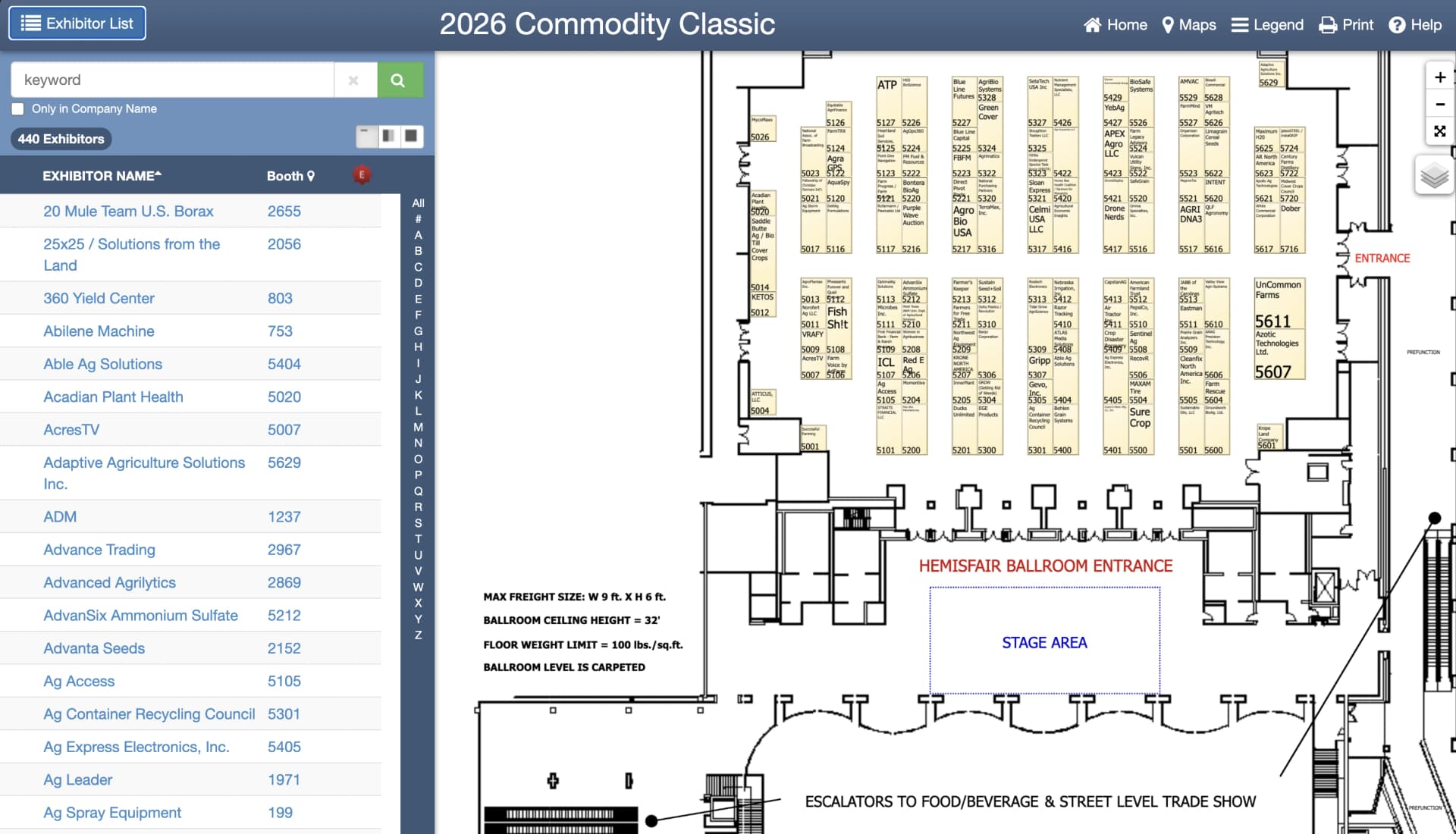
What Event Websites Typically Publish
| Data Type | How Often Published | Reliability |
|---|---|---|
| Exhibitor list | Almost always | Very high – these companies paid to be there |
| Exhibitor floor plan | Very common | High – booth locations and sizes |
| Speaker list | Common | High – speakers are confirmed attendees |
| Sponsor list | Almost always | Very high – sponsors are heavily invested |
| Attendee directory | Rare | Medium – depends on opt-in rates |
| Session/agenda | Very common | High – includes speaker companies |
Tools for Scraping Event Websites
Manually copying exhibitor lists from event websites is tedious, especially when the data is spread across paginated directories or interactive maps. Here are tools that can automate the extraction:
AI-Powered Browser Automation
A new generation of AI-driven browser tools can navigate complex event websites, handle JavaScript-rendered content, and extract structured data:
- Browser Use: open-source browser automation agent that uses AI to navigate web pages and extract data. You describe what you want in natural language, and it figures out how to get it. Works well for exhibitor directories that require clicking through pagination or interactive elements
- Browserbase: cloud browser infrastructure for running automated browser sessions. Useful when you need to scrape at scale or from a clean IP
- OpenAI Atlas: agentic browser from OpenAI that can browse the web and perform tasks. Good for one-off extractions where you need to navigate a complex site
- Perplexity Comet: agentic browser from Perplexity that can browse the web, extract structured information, and perform multi-step tasks. Useful for quick lookups and data extraction
These tools are the easiest way to get started – you don't need to write code, and they handle the messy parts like JavaScript rendering and pagination automatically. The trade-off is less control over exactly how the data is extracted and structured.
Traditional Web Scraping
If you need more precision or plan to scrape the same event website repeatedly (say, to track new exhibitors as they register), code-based tools are worth the setup time:
- Scrapy (Python) – mature, high-performance web scraping framework. Handles pagination, follows links, and outputs structured data
- Puppeteer (Node.js) / Playwright (multi-language) – headless browser automation for JavaScript-heavy sites
- Apify: cloud platform with pre-built scrapers and the ability to deploy custom ones. Has a marketplace of ready-made scrapers for common website patterns
The learning curve is steeper, but once you have a working scraper, you can run it on a schedule and get fresh data as often as you need. For teams that attend the same events year after year, this pays for itself quickly.
No-Code Scraping
If your team doesn't have a developer available but the AI tools above feel too unpredictable, no-code scraping tools sit in the middle. They give you a visual interface to define what data you want to extract, without writing a single line of code:
- Bardeen: browser extension that automates repetitive web tasks, including data extraction
- Instant Data Scraper: Chrome extension that detects data patterns on pages and exports to CSV
- Octoparse: visual web scraping tool with point-and-click interface
Extracting Maximum Value from Exhibitor Lists
Once you have the raw exhibitor list, here's how to extract maximum value:
Company Identification
Event websites usually list company names and sometimes descriptions, but not always with enough detail to evaluate ICP fit. You'll need to:
- Match company names to their websites (often listed on the event page)
- Look up firmographic data (industry, size, revenue) using tools like Crunchbase or Apollo
- Visit the company's website to understand what they do and whether they're a fit
Finding the Right People
Exhibitor lists tell you which companies are attending, but not which people from those companies will be at the booth. To find the right contacts:
- Search LinkedIn for people at the company who mention the event
- Look for "Event Manager," "Trade Show Coordinator," or similar titles
- Target VP/Director-level roles in the department most relevant to your product
- Use enrichment tools to get their contact information
Booth Analysis
If the event publishes a floor plan, you can extract additional intelligence:
- Booth size correlates with budget and investment level. Larger booths = bigger companies with more resources
- Location matters – booths near entrances, food areas, or main stages get more traffic. Companies in premium locations are investing heavily
- Neighboring booths: companies in the same section are often in the same industry vertical, which can help you cluster your meetings geographically for efficient floor navigation
Method 4: Event Apps and Registration Platforms
Many modern trade shows use digital platforms that provide networking features – and these platforms often expose attendee data that you can use for pre-event research.
Major Event Platforms
The platform your event uses determines what data you can access and how early you can start networking. Here are the ones you'll encounter most often.
 Image source: brella.io
Swapcard
Website: swapcard.com
Swapcard is one of the most popular event management platforms, used by events like VivaTech and Web Summit. It offers:
- Full attendee directories with profiles, titles, and companies
- AI-powered matchmaking that suggests relevant attendees based on your profile
- In-app messaging for direct outreach
- Session RSVP tracking
How to leverage it: Register for the event on Swapcard as early as possible. Fill out your profile completely to improve matchmaking results. Then browse the attendee directory and use the built-in filters to identify ICP-matching companies.
Grip
Website: grip.events
Grip focuses on AI-driven matchmaking for events. Features include:
- Attendee recommendations based on mutual interests
- Meeting scheduling directly within the platform
- Company profiles with attendee lists
Important note: Grip typically works with event organizers, not individual attendees directly. They provide the matchmaking and networking infrastructure that powers the event's official platform. However, if the event you're attending uses Grip, you can take full advantage of its features – browse attendee directories, get AI-powered match suggestions, and schedule meetings through the platform.
Brella and Whova
Two other platforms worth knowing about are Brella and Whova. Brella is popular with mid-size events and focuses on interest-based matchmaking and 1-on-1 meeting scheduling – its attendee directory is searchable and filterable, which makes pre-event research straightforward. Whova covers conferences and trade shows of all sizes, and its standout feature is a community board where attendees interact before the event starts. People post introductions, share what they're looking for, and coordinate meetups – essentially giving you free intent signals before you even reach out.
Both platforms provide attendee directories you can browse after registering, but the depth of information varies by event. Some organizers configure the platform to show full profiles with titles and companies; others only expose names.
Registration Platforms with Public Data
Beyond dedicated event platforms, some events use general-purpose registration tools that can still expose useful attendee data. Eventbrite sometimes enables public attendee lists or "who's going" features, though this is more common for smaller events. Hopin (now part of RingCentral) is used for virtual and hybrid events and occasionally provides browsable attendee directories. Cvent is common for enterprise events, but attendee visibility depends entirely on how the organizer has configured the platform.
The key insight with registration platforms is that data availability is controlled by the event organizer, not the platform itself. Even if the platform supports public attendee lists, the organizer may have disabled them.
How to Find Which Platform an Event Uses
Before you can leverage any of these platforms, you need to figure out which one your event is using. The fastest way is to check the event website's registration page – it usually redirects to or embeds the platform. You can also download the event's mobile app, which is typically branded by the platform provider (the app listing in the store will show Swapcard, Grip, etc. as the developer). If you've already registered, check your confirmation email – it often includes direct links to the networking platform.
Method 5: Monitor Public Announcements and Intent Signals
Not everyone announces their trade show plans on LinkedIn. But companies frequently signal their attendance through other channels that you can monitor.
Press Releases and News Coverage
Companies often issue press releases when they're exhibiting at a major trade show, especially if they're launching a new product or hosting a special event at the booth.
How to Set Up Monitoring
You need tools that go beyond basic news alerts and actually track mentions across social media, forums, blogs, and niche communities where real attendees talk about events.
- Brandwatch: enterprise-grade social listening platform that monitors mentions across social media, news, blogs, forums, and review sites. Set up queries for your event name and variations – Brandwatch will surface every public mention, including from Reddit threads, niche blogs, and industry forums that simpler tools miss. It also provides sentiment analysis and trend tracking, so you can see when buzz around an event is picking up
- Brand24: a more affordable alternative to Brandwatch that still covers social media, news, blogs, podcasts, forums, and review sites. Set up a project with keywords like
"[Event Name]" exhibitingor"[Event Name]" boothand get real-time alerts. Brand24 also tracks Reddit, Quora, and other community platforms automatically - Mention.com: tracks mentions across the web and social media in real time. Good middle ground between free tools and enterprise platforms. Covers news sites, blogs, forums, and social channels
- Reddit monitoring: Reddit is underrated for trade show intelligence. People post candidly about which events they're attending, share booth tips, and coordinate meetups. You can monitor relevant subreddits manually, or use tools like Syften or F5Bot (free) that send you alerts whenever your keywords appear on Reddit. Search for patterns like
"[Event Name]"in industry subreddits to catch "who's going?" threads and attendance confirmations - Industry-specific news sites: most industries have trade publications that cover major events. For example:
- Construction: ENR (Engineering News-Record)
- Healthcare IT: Healthcare IT News
- Consumer electronics: The Verge, TechCrunch
What to Look For
- "Companies to watch at [Event]" articles: media partners and industry journalists publish these roundups before major events. They're goldmines for identifying notable exhibitors
- Product launch announcements: companies timing product launches with trade shows will usually announce this in advance
- Sponsorship announcements: the event organizer's own press releases list new sponsors
- Speaking announcements: companies whose executives are speaking at the event will usually promote this
Community and Forum Monitoring
Professional communities frequently discuss upcoming events:
Search relevant subreddits for the event name. Common patterns:
- "Who's going to [Event]?" threads
- "First time at [Event], any tips?" posts (reveals new attendees)
- Post-event recap threads from previous years (reveals repeat attendees)
Use Reddit's search for more powerful filtering.
Industry Slack and Discord Communities
Many industries have active Slack workspaces or Discord servers where members discuss events:
- Marketing: Demand Curve, Superpath
- DevTools: Various Discord servers
Search message history for event names. People often coordinate meetups, share booth locations, or ask for recommendations within these communities.
LinkedIn Groups
Many large events have official or unofficial LinkedIn groups:
- Search LinkedIn Groups for the event name
- Join the group (some are open, others require approval)
- Browse member discussions – people often introduce themselves and share what they're looking for
- The member list itself is valuable – it shows people who are interested enough in the event to join the group
Job Postings as Intent Signals
This is a less obvious signal, but it works: companies hiring for event marketing roles or mentioning specific trade shows in job descriptions are likely attending.
Search job boards for:
"[Event Name]"in job descriptions- "Trade show" + your target industry + your target geography
- "Event marketing manager" at companies in your ICP
This won't tell you exactly who's going, but it reveals companies that are investing in trade show presence.
Method 6: Work Backwards from Your ICP
Every method above starts with the event and works forward: find attendees, then filter for ICP. But you can flip this approach entirely.
The Reverse Lookup Strategy
Instead of "Who's attending this event?" ask "Are any of my target accounts attending this event?"
Two approaches to finding targets at events
Event-first approach
Event attendee list
500+
Qualified targets
~50
Easier to start — but most effort goes to filtering out non-matches
Reverse ICP approach
Your ICP target list
200
Confirmed ICP at event
~50
Results are pre-qualified — but finding who attends which event is hard
Step 1: Build Your Target Account List
Use your existing ICP definition to build a list of companies you'd love to meet. Tools for this:
- Apollo: comprehensive B2B database with firmographic and technographic filters. Free tier available
- ZoomInfo: enterprise-grade B2B intelligence platform. More expensive but often more complete data
- LinkedIn Sales Navigator: filter by industry, headcount, geography, and more
- Crunchbase: good for startup and tech company data, funding status, and growth signals
- Clay: data enrichment platform that pulls from 75+ data sources to build and enrich prospect lists
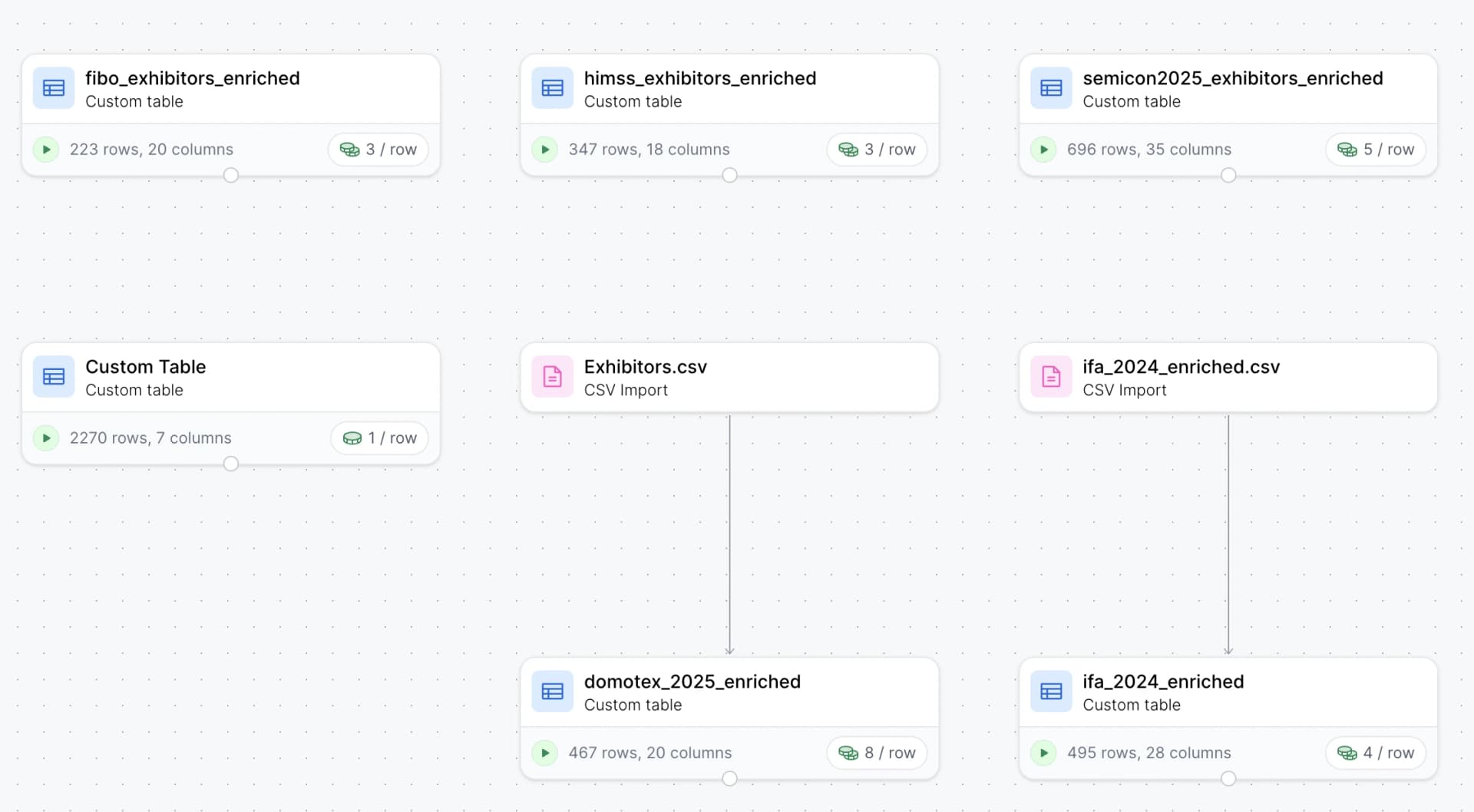
Step 2: Cross-Reference Against Event Data
For each company on your list, check:
- Event exhibitor list: is the company listed as an exhibitor?
- LinkedIn: search for
"[Company Name]" AND "[Event Name]"to find employees posting about attending - Company website / newsroom: check their events page or press releases for mentions of the event
- 10times or Exhibitors Data: look up the company in their database to see which events they're associated with
Step 3: Find the Right Person
Once you've confirmed a target account is attending, identify the best person to meet:
- Search LinkedIn for people at the company who mentioned the event
- If nobody posted, look for titles like "VP of Sales," "Business Development Director," or relevant department heads
- Check if the company has any speakers at the event – speakers are almost certainly attending and are often senior
- Use Apollo or Hunter.io to find email addresses
Why This Approach Works
The reverse lookup has a huge advantage: you already know every company on your list is a fit. There's no ICP filtering step. You're just confirming attendance –it's essentially a trade show pre-qualification service built from your own data.
This means:
- Zero wasted effort researching companies that don't match your ICP
- Higher confidence in every meeting you book –you can secure executive meetings at the event
- More personalized outreach because you've already researched the company
When to Use This vs. Event-First Approach
| Scenario | Best Approach |
|---|---|
| You have a well-defined ICP and a target account list | Reverse lookup |
| You're exploring a new market or event | Event-first (cast a wide net) |
| The event is very large (10,000+ attendees) | Reverse lookup (too many attendees to evaluate one by one) |
| The event is small/niche (under 500 attendees) | Event-first (small enough to evaluate everyone) |
| You're attending multiple events per quarter | Reverse lookup (reuse your target account list across events) |
Method 7: Leverage Past Event Data
Trade shows tend to have high repeat rates – many exhibitors and attendees come back year after year. Historical data from previous editions of the same event is one of the most reliable predictors of future attendance.
Where to Find Historical Attendee and Exhibitor Data
Event Websites (Archived)
Previous years' exhibitor pages are sometimes still live on the event website, just at a different URL (e.g., event2025.com vs. event2026.com). If they've been taken down, try:
- Wayback Machine: archive.org caches billions of web pages. Search for the event's exhibitor page URL from previous years
- Google Cache: search
cache:[exhibitor page URL]in Google - Google search with date filter: search for
site:eventwebsite.com exhibitorsand filter by date range to find older pages
YouTube and Video Content
Event organizers, media partners, and attendees themselves publish video content that reveals who was there:
- Booth tours: walk-through videos showing exhibitor names and booth setups
- Interview series: media companies often film short interviews with exhibitors, including company name and booth number
- Keynote and session recordings: speakers' names, titles, and companies are visible
- Aftermovies and highlight reels: often show booth signage and attendee badges
Search YouTube for "[Event Name] 2025" or "[Event Name] booth tour".
Post-Event Reports
Many events publish recap documents that include:
- Total attendee and exhibitor counts
- Lists of notable exhibitors and sponsors
- Testimonials from attendees (including names and companies)
- Industry breakdown of attendees
- Geographic distribution
These reports are often available as PDF downloads on the event website, or through a Google search for "[Event Name] post-event report".
Photo Galleries
Event photographers and media partners publish photo galleries on:
- The event's official website
- Flickr albums
- Getty Images (for larger events)
- Social media (search event hashtags on Instagram)
Photos often show booth signage, badge close-ups, and company names on displays. This is labor-intensive to work through manually, but can reveal exhibitors not listed elsewhere.
How to Use Historical Data
- Build a "likely returning" list: compile exhibitors from the past 2–3 years. Companies that exhibited multiple years in a row are very likely to return
- Identify first-timers vs. veterans: companies exhibiting for the first time might be more open to meetings (they're trying to make connections). Veterans might be harder to reach but more established
- Track booth size changes: a company that upgraded from a 10x10 to a 20x20 booth is investing more in the event and is likely a more serious target
- Spot companies that stopped attending: if a past exhibitor is no longer listed, they might have shifted strategy. Could be an opportunity to reach them through other channels
Method 8: Buy Attendee Lists from the Event Organizer
The most direct (and often most overlooked) approach: just ask the event organizer if they sell attendee data.
What Organizers Typically Offer
- Pre-event attendee lists: some events sell registered attendee lists to exhibitors and sponsors as part of premium packages
- Lead retrieval upgrades: higher-tier exhibitor packages often include access to attendee data
- Sponsorship perks: many sponsorship tiers include attendee lists, email sends, or direct introductions
- Matchmaking programs: some events offer curated meeting programs (sometimes called "hosted buyer" programs) where they match attendees with exhibitors based on interests
How to Ask
Contact the event's sales or partnerships team directly. Common contact points:
- "Become an exhibitor" or "Sponsor" pages on the event website
- The event organizer's LinkedIn page
- Industry contacts who have exhibited before (they can often make introductions)
Ask specifically about:
- Pre-event attendee lists or directories
- Premium exhibitor packages that include attendee data
- Hosted buyer or matchmaking programs
- Sponsored email sends to the attendee list
Pricing and Value
Organizer-provided data varies wildly in quality and price:
- Small events might provide basic attendee lists for free with exhibitor registration
- Major events can charge $5,000–$20,000+ for pre-event data access, often bundled into sponsorship packages
- "Hosted buyer" programs are usually the most expensive but offer the highest-quality introductions
Limitations
- Not all events sell data: privacy regulations (especially GDPR for European events) have made many organizers more cautious about sharing attendee information
- Opt-in only: even when data is available, it often only includes attendees who opted into being contacted
- Format varies: you might get a polished spreadsheet, or you might get a raw export from their registration system
- Timing: pre-event lists might not be available until a few weeks before the event, limiting your outreach window
Method 9: Leverage Exhibitor Data Creatively
Once you've obtained an exhibitor list through any of the methods above, there are several creative ways to extract more value from it.
Find Similar Companies
Exhibitors at a trade show represent a curated list of companies in a specific industry. You can use this as a seed list to find additional targets:
- Identify common characteristics: what do the exhibitors have in common? Industry, company size, technology stack, geography?
- Use lookalike search: tools like Apollo and Clay can find companies similar to a list of seed companies
- Check competitors: for each exhibitor, identify their direct competitors. Those competitors might also be attending (or might be good targets even if they're not)
Caveat: Similar companies aren't guaranteed to be attending. This method expands your universe of potential targets, but you lose the attendance confirmation that makes pre-event outreach so effective.
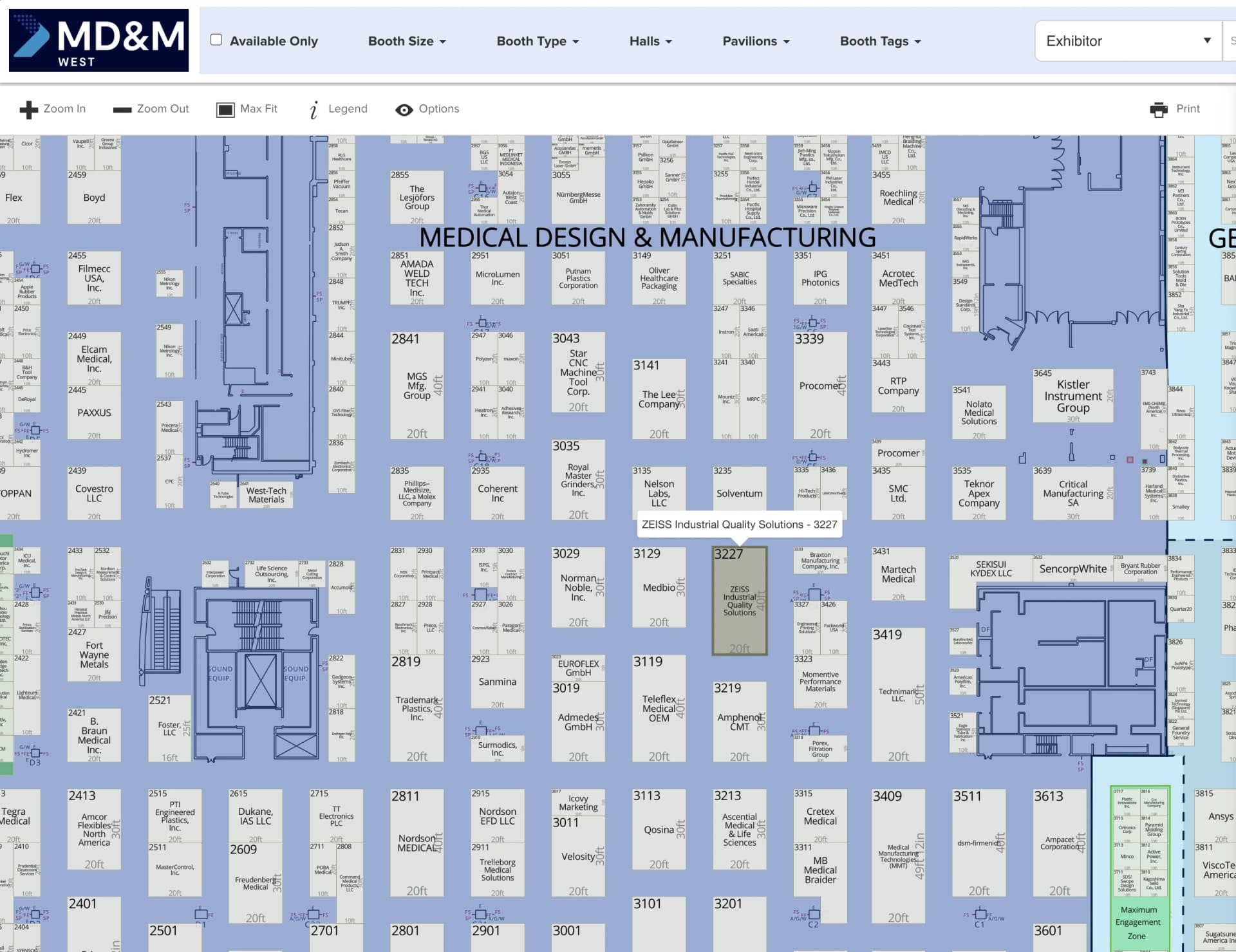
Floor Plan Intelligence
While the exhibitor list tells you who is attending, the floor plan tells you how seriously they're investing. Event floor plans are almost always publicly available and contain information that most people overlook.
Booth size directly correlates with investment level – a company paying $50,000 for a 30x30 island booth is far more committed than one with a $3,000 tabletop. Location matters too: booths near entrances, main stages, food areas, and registration get the most foot traffic, and companies in premium locations are spending significantly more to be there. Many events also organize exhibitors by vertical or product category, which helps you plan your route through the show floor so you can hit multiple meetings without crisscrossing the venue. Finally, some events mark first-time exhibitors on the floor plan – these companies are often more eager to connect and build relationships than the veterans.
The practical move here is to download the floor plan early and overlay it with your target list. Color-code by priority. Plan a physical route that clusters your meetings geographically. This sounds simple, but it can easily add 2-3 extra meetings to your day just by eliminating wasted walking time.
Identify Decision-Makers for Each Exhibitor
Knowing a company is exhibiting is only half the story – you need to figure out which person at that company is worth meeting. The most reliable approach is a LinkedIn search for "[Company Name]" AND ("trade show" OR "[Event Name]"), which often reveals exactly who from the company will be at the booth. If nobody has posted, check the company's LinkedIn page, blog, or newsroom for event-specific announcements. Failing that, search for VP/Director-level roles in sales, marketing, or business development –these are typically the people staffing the booth who can actually make decisions. And if the event uses a networking platform, the company's registered attendees are often listed right there.
Use Exhibitor Data for Competitive Intelligence
Even if you're not trying to book meetings with exhibitors, the exhibitor list is a window into your competitive landscape. The other exhibitors are all potential customers or partners for your competitors – studying who's there tells you where the market's attention is going. Are new categories of companies emerging? Are established players pulling back? You can also spot non-competing exhibitors serving the same audience, which might make excellent partnership targets for co-marketing, integrations, or referral arrangements.
Comparison: Which Method to Use When
Every method has trade-offs. Here's a decision framework:
| Method | Cost | Effort | Data Quality | Coverage | Best For |
|---|---|---|---|---|---|
| Event data providers (10times, Exhibitors Data) | $$–$$$ | Low | Medium | Broad | Quick initial scoping |
| LinkedIn advanced search | Free–$ | High | Very high | Partial | High-quality, confirmed attendees |
| Event website scraping | Free | Medium | High | Exhibitors only | Reliable exhibitor data |
| Event apps/platforms | Free | Low | High | Opt-in only | Events using modern platforms |
| Public announcement monitoring | Free–$ | Medium | Medium | Partial | Supplementary signals |
| Reverse ICP lookup | $–$$ | Medium | Very high | Targeted | Well-defined ICP, large events |
| Past event data | Free | High | Medium | Historical | Predicting repeat attendees |
| Organizer attendee lists | $$$–$$$$ | Low | High | Comprehensive | Budget-available, major events |
| Creative exhibitor analysis | Free | Medium | Medium | Expanded | Maximizing existing data |
Recommended Combinations
No single method covers everything. The best approach depends on your resources.
For small teams with limited budget, keep it simple and lean on free tools. Scrape the event website for the exhibitor list, run LinkedIn searches to find people who've posted about attending, and cross-reference both against your existing ICP list. This takes more manual effort, but the only cost is your time – and the signal quality from LinkedIn posts is genuinely high.
For mid-size teams with some budget, layer in a data provider to speed up the scoping phase. Use 10times to quickly see which companies are associated with the event, then scrape the event website and monitor the event app for additional attendees. LinkedIn search still plays a key role for confirming attendance and finding the right contacts. Once you've identified your targets, enrich them with Apollo or ZoomInfo to get emails and firmographic data before reaching out.
For enterprise teams with dedicated operations, go broad. Buy the organizer's attendee list and supplement it with a dataset from Exhibitors Data to maximize coverage. Cross-reference everything against a reverse ICP lookup so you're only pursuing accounts that fit. Layer in LinkedIn and social monitoring to catch any attendees the paid data missed, and use AI tools for processing and enrichment at scale – at this level, the bottleneck isn't sourcing the data but cleaning, deduplicating, and acting on it fast enough.
Don't Forget About Data Processing
One thing worth keeping in mind: finding attendee data is only part of the trade show meeting booking process. Once you have it, there's still work to turn raw lists into actionable outreach.
Specifically, you'll want to:
- Deduplicate: the same company often appears across multiple sources with slightly different names ("IBM" vs "IBM Corporation" vs "International Business Machines")
- Verify: data from a few months ago might be outdated – people change jobs, companies change plans
- Enrich: raw event data usually lacks the firmographic and contact details you need for effective outreach
- Evaluate ICP fit: reviewing hundreds of companies against your ICP criteria takes time. LLMs can help, but you still need to build the workflow
- Craft personalized outreach: generic "let's meet at the show" messages get ignored. Good outreach references specific reasons why the meeting would be valuable for both parties
- Manage responses and scheduling: coordinating meeting times, handling reschedules, and confirming logistics across dozens of prospects adds up
Budget 2–4 weeks for the full pipeline –from sourcing through confirmed meetings –if you're handling B2B lead generation for events yourself. This is why many teams turn to an exhibition lead generation agency or trade show appointment setters to handle the process end-to-end.
After sourcing: the other 80% of the work
1. Deduplicate
"IBM" vs "IBM Corporation" vs "International Business Machines"
2. Verify
Confirm data is current — people change jobs, plans shift
3. Enrich
Add firmographic data, contact details, technographics
4. Evaluate ICP fit
Score hundreds of companies against your criteria
5. Craft personalized outreach
Custom messages referencing specific reasons to meet
6. Manage scheduling
Coordinate times, handle reschedules, confirm logistics
Total: 2–4 weeks of dedicated effort per event
Skip the Work. Get Guaranteed Trade Show Meetings.
At Outrizz, we're a trade show lead generation service that runs this entire pipeline for you. Every method described in this article –data providers, LinkedIn research, web scraping, enrichment, ICP evaluation, personalized outreach, and conference meeting scheduling –is part of what we do for every client, for every event.
Here's the offer: 10 guaranteed qualified meetings at your next trade show for a fixed $2,990.
- We find and engage trade show attendees using every method available
- We filter and pre-qualify against your exact ICP
- We reach out with personalized, brand-safe messaging
- We pre-book meetings on your calendar before you arrive
- If we don't deliver 10 meetings, you get your money back –performance-based appointment setting with zero risk
No data wrangling. No hours on LinkedIn. No scraping tools to figure out. Our outsourced appointment setting handles everything so you can fill your calendar before the event and stop wasting trade show budget on unqualified leads.
Check your meeting potential –we'll tell you within 24 hours how many meetings we can book and whether we can deliver predictable trade show ROI for your next event.
Share this article
Ready to book meetings at your next trade show?
We guarantee 10 qualified meetings before you arrive — or your money back.
Check event fit